DBK skifter, i forbindelse med den opgraderet Bogportal, til metadataudveksling via API i ONIX-format.
Det betyder at den eksisterende dataleverance ophører og at kunder der modtager data fra DBK i stedet skal anvende den nye dataleverance via API.
Alle kunder der i dag abonnerer på dataleverancer, er bilateralt orienteret om denne ændring.
Følgende beskrivelser vil være på engelsk, da informationen primært er henvendt til udvikling og dokumentation.
For danske hjælpeartikler se mere i Hjælpeuniverset.
* This API will replace the current file-based deliverables of book metadata from Bogportalen.
* First priority is to onboard existing customers to the API. After the launch of the new Bogportalen platform, the Api will be opened up for new customers.
* Existing customers will contacted directtly regarding login details
This API is intended for retrieving product metadata in bulk.
In this version, the API is not designed for high volumes of requests for individual products, for example through direct calls when product pages are displayed on a webshop. Misuse of the API may result in account suspension.
Postman collection
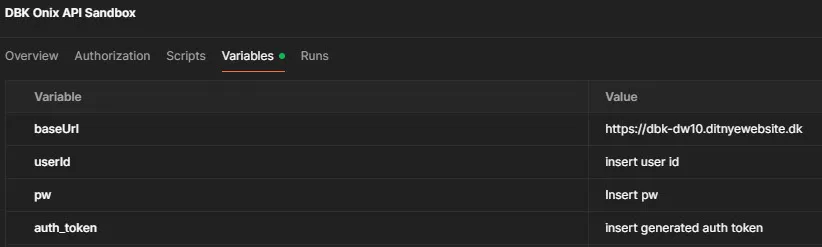
To get a quick start with the API, a Postman collection has been created, with examples of autentifikation and the different JSON body options.
To use the collection:
- Insert “https://dbk-dw10.ditnyewebsite.dk” as baseUrl in the collection Variables
- Insert your username and password for the API, provided by DBK in the collection variables, and run the “Get API token” request in the collection
- Insert the token from the request in the collection variables.
- You’re now ready to send data to DBK
1) Overview
Purpose: Access product metadata from Bogportalen for integration with your systems.
Production endpoints:
Authentification: TBA
Data export request: TBA
Sandbox endpoints
Authentification: https://dbk-dw10.ditnyewebsite.dk/dwapi/users/authenticate
Data export request: https://dbk-dw10.ditnyewebsite.dk/onix/document/export/v3.1
Formats: xml in onix format; charset=utf-8 (requests & responses). See Onix data format here
2) Authentication & Authorization
Use DW authentication endpoint: https://dbk-dw10.ditnyewebsite.dk/dwapi/users/authenticate
Post the following JSON object to the endpoint:
					{
  "username": "string",
  "password": "string"
}
The returned bearer token is used as authorization header in the export requests to the endpoint.
3) Filtering
Pagination: n/a.=>Use filters
Filtering: JSON body options
- productIds 13 digit EAN numbers (eg.: 9788702152098)
- publisher: DBK customer number (eg.: 170864). Please notice that publishers and expeditions can only see their own data!
- updatedFrom: ISO 8601-date/timestring (eg.: 20250204T0930-0400). Used to get data updated after a certain date
- themaCode: 2 digits or more (eg.: WB or WBHS. See theme codes here)
- expedition: the expedition that handles the book. (Allowed values: DBK|DAF|Egen). Please notice that expeditions can only see their own data
- productType: (Onix codelist 150 values from Onix-out specification )
- marketPublishingStatus: (Onix codelist 68 values). See what statuses can be used by publishers/bookstores here
stockStatus: (true|false. false=no stock available, true=stock available
Example on JSON body options:
					{
  "productIds": [
    "string"
  ],
  "marketPublishingStatus": "string",
  "createdFrom": "2025-11-07T04:08:00.333Z",
  "createdTo": "2025-11-07T04:08:00.333Z",
  "updatedFrom": "2025-11-07T04:08:00.333Z",
  "themaCode": "string",
  "publisher": "string",
  "expedition": "string",
  "productType": "string",
  "stockStatus": true
}
4) Pagination
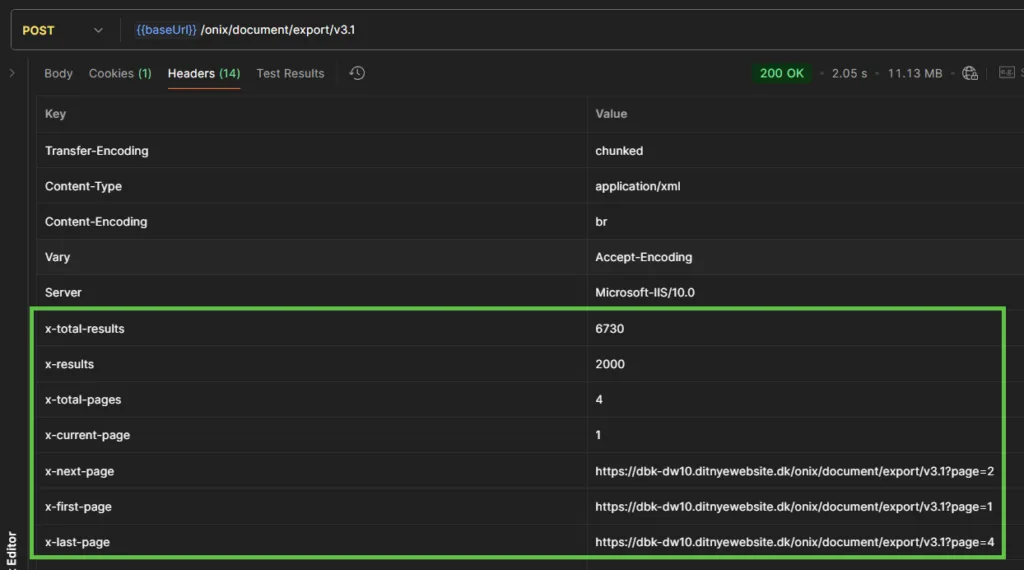
Data for pagination is returned in the response header. Use the pagination data to determine if and how many times the request needs to be repeated with a new url, to fetch alle data requested.
The following pagination data is available in the response header:
- x-total-results: Always available. Total products matching the request. Eg. “6.730”
- x-results: Always available. Products returned in the current page of the request. Eg. “2.000”
- x-total-pages.: Always available. Total pages that need to be iterated through to retrieve all data in the request. Eg. “4”
- x-current-page: Always available. Current page. Eg. “1”
- x-next-page: Only available if there is more pages than the current as part of the result. Url to the next page of the result. Eg. “https://dbk-dw10.ditnyewebsite.dk/onix/document/export/v3.1?page=2”
- x-first-page: Always available. Url to the first page of the result. Eg. “https://dbk-dw10.ditnyewebsite.dk/onix/document/export/v3.1?page=1”
- x-last-page: Always available. Url to the last page of the result. Eg. “https://dbk-dw10.ditnyewebsite.dk/onix/document/export/v3.1?page=4”
5) Limits & Quotas
Policy:
- Requests will return up to 2.000 products
In cases where a request provides more than 2.000 results, details for the response, and how retrieve the next results are added to the response header.
6) Status codes and errors
Status codes:
- 200: OK
- 204: Request OK, but no content. Could be due to filters that provides no results
- 401: Unauthorized. Publisher Id in request does not match current logged in publisher
- 5xx server error
The list of error codes will be further extended when the sandbox version of the API is ready.
Example on error body:
{
"type":"https://tools.ietf.org/html/rfc9110#section-15.5.2",
"title":"Publisher Id in request does not match current logged in publisher",
"status":401,
"detail":"To request an onix output please request the same Publisher ID as the currently logged in publisher",
"traceId":"00-5d607d7dc612f1adfc7cae47189f8035-b3feb12c115e9d8e-00"
}
7) SLs & Status
Uptime target: 99.9% monthly.
Maintenance windows: Announced 7 days ahead (non-critical).
Status page: Public status + historical incidents. · Support: FAQ/Support page on dbk.dk. Email + ticketing portal, business hours CET/CEST.
Version history
| Date | Version | Comment |
|---|---|---|
|
13-1-2026 |
3.1 |
First version of the API in sandbox mode. Please notice that there might be minor changes to this before it goes into production |