- Opdateret: 23. september 2026
Levering af metadata til DBK - Delivery of metadata to DBK
Format for dataudveksling
DBK har i forbindelse med den opgraderede Bogportal skiftet til metadataudveksling via API i ONIX-format.
Følgende beskrivelser vil være på engelsk, da informationen primært er henvendt til udvikling og dokumentation.
For danske hjælpeartikler se mere i Hjælpeuniverset.
* This API will replace the current file-based deliverables of book metadata to Bogportalen.
* First priority is to onboard existing customers to the API. After the launch of the new Bogportalen platform, the API will be opened up for new customers.
* Existing customers will contacted directtly regarding login details
Postman collection
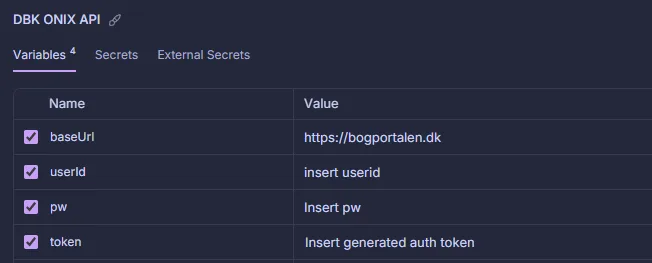
To get a quick start with the API, a Postman collection has been created, with examples of autentifikation and the different JSON body options.
To use the collection:
- Insert “HTTPS://bogportalen.dk” as baseUrl in the collection Variable
- Insert your username and password for the API, provided by DBK in the collection variables, and run the “Get API token” request in the collection
- Insert the token from the request in the collection variables.
- You’re now ready to send data to DBK
1. Overview
Purpose: Integration to send product metadata to Bogportalen.
Production endpoints:
Authentication: HTTPS://bogportalen.dk/dwapi/users/authenticate
Data import request: HTTPS://bogportalen.dk/onix/document/export/v3.1
Formats: XML in ONIX format; charset=utf-8 (requests & responses). See ONIX format for data to DBK here.
2) Authentication & Authorization
Use DW authentication endpoint: https://HTTPS://bogportalen.dk/dwapi/users/authenticate
Post the following JSON object to the endpoint:
					{
  "username": "string",
  "password": "string"
  "expirationInSeconds": int
}
ExpirationInSeconds specifies how long your token will remain valid. The maximum allowed value is 86,400 seconds, which corresponds to 24 hours.
The returned bearer token is used as authorization header in the export requests to the endpoint.
3) Send ONIX file
After a token has been generated, it’s possible to upload a XML file with ONIX data to HTTPS://bogportalen.dk/onix/document/export/v3.1 by using the JWT authentication as bearer token in the Authorization header
The request must be sent as multipart/form-data.
4) Status codes and errors
Status codes:
- 200: OK
- 204: Request OK, but no content. Could be due to filters that provides no results
- 401: Unauthorized. Publisher Id in request does not match current logged in publisher
- 5xx server error
The list of error codes will be further extended when the sandbox version of the API is ready.
Example on error body:
{
"type":"https://tools.ietf.org/html/rfc9110#section-15.5.2",
"title":"Publisher Id in request does not match current logged in publisher",
"status":401,
"detail":"To request an onix output please request the same Publisher ID as the currently logged in publisher",
"traceId":"00-5d607d7dc612f1adfc7cae47189f8035-b3feb12c115e9d8e-00"
}
5) Limits & Quotas
Policy:
- Up to 2,000 products can be sent in a request
6) SLs & Status
Uptime target: 99.9% monthly.
Maintenance windows: Announced 7 days ahead (non-critical).
Status page: Public status + historical incidents. · Support: FAQ/Support page on dbk.dk. Email + ticketing portal, business hours CET/CEST.
7) Image upload endpoint
Normally, images are uploaded as a URL together with the other product updates, after which DBK retrieves the images from the specified URL.
However, it is also possible to upload images through a dedicated endpoint.
This endpoint may be relevant in the following situations:
- There are many updates related only to images and not to the other product data
- If it is not possible to provide the images through a URL that DBK can access. In such cases, the images can instead be sent directly to DBK.
URL: https://bogportalen.dk/productfileuploadapi/UploadFiles
Limits: A maximum of 50 images can be uploaded per request
Encoding: Images should be added to the request as Base64 encoded strings
Supported file formats: .jpg, .png, .gif, .bmp, .webp
Supported file types: FrontPage
{
  "files": [
    {
      "productEAN": "string", // EAN of relevant product.
      "fileName": "string", // Example: "testimage.jpeg"
      "fileType": "string", // Example: FrontPage,
      "base64EncodedFile": "string" // Example: "ZGV0IGhlciBlciBldCByaWd0aWd0IGJpbGxlZGUgb2cgaWtrZSBlbiByw6UgdGVrc3Qgc3RyZW5nLg=="
    },
    {
      "productEAN": "string",
      "fileName": "string",
      "fileType": "string",
      "base64EncodedFile": "string"
    }
  ]
}
Version history
Uptime target: 99.9% monthly.
Maintenance windows: Announced 7 days ahead (non-critical).
Status page: Public status + historical incidents. · Support: FAQ/Support page on dbk.dk. Email + ticketing portal, business hours CET/CEST.
| Date | Version | Comment |
|---|---|---|
|
11-5-2026 |
3.2 |
API updated with the image upload functionality |
|
13-1-2026 |
3.1 |
First version of the API in sandbox mode. Please notice that there might be minor changes to this before it goes into production |
Spørgsmål til denne side?
Indsend dit spørgsmål i nedenstående formular, så vender vi tilbage hurtigst muligt.