- Opdateret: 23. september 2026
Levering af metadata fra DBK - Delivery of metadata from DBK
Format for dataudveksling
DBK skifter, i forbindelse med den opgraderede Bogportal, til metadataudveksling via API i ONIX-format.
Det betyder, at den eksisterende dataleverance ophører, og at kunder der modtager data fra DBK i stedet for skal anvende den nye dataleverance via API.
Alle kunder der i dag abonnerer på dataleverancer, er bilateralt orienteret om denne ændring.
Følgende beskrivelser vil være på engelsk, da informationen primært er henvendt til udvikling og dokumentation.
For danske hjælpeartikler, se mere i Hjælpeuniverset.
* This API will replace the current file-based deliverables of book metadata to Bogportalen.
* The old API was discontinued when the new Bogportalen platform went live in September 2026.
* First priority is to onboard existing customers to the API. After the launch of the new Bogportalen platform, the API will be opened up for new customers.
* Existing customers will be contacted directly.
This API is intended for retrieving product metadata in bulk.
In this version, the API is not designed for high volumes of requests for individual products, for example through direct calls when product pages are displayed on a webshop. Misuse of the API may result in account suspension.
Postman collection
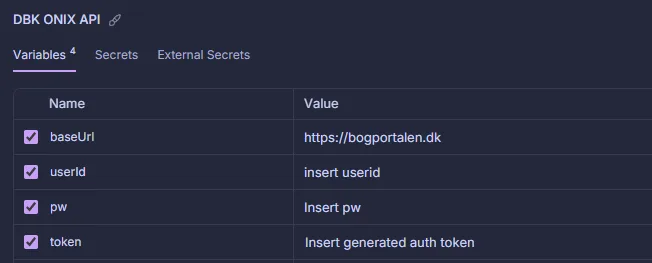
To get a quick start with the API, a Postman collection has been created, with examples of authentication and the different JSON body options.
To use the collection:
- Insert “HTTPS://bogportalen.dk” as baseUrl in the collection Variable
- Insert your username and password for the API, provided by DBK in the collection variables, and run the “Get API token” request in the collection
- Insert the token from the request in the collection variables
- You’re now ready to send data to DBK
1. Overview
Purpose: Access product metadata from Bogportalen for integration with your systems.
Production endpoints:
Authentication: HTTPS://bogportalen.dk/dwapi/users/authenticate
Data export request: HTTPS://bogportalen.dk/onix/document/export/v3.1
Formats: XML in ONIX format; charset=utf-8 (requests & responses). See ONIX data format here
2) Authentication & Authorization
Use DW authentication endpoint: HTTPS://bogportalen.dk/dwapi/users/authenticate
Post the following JSON object to the endpoint:
					{
  "username": "string",
  "password": "string",
  "expirationInSeconds": int
}
ExpirationInSeconds specifies how long your token will remain valid. The maximum allowed value is 86,400 seconds, which corresponds to 24 hours.
The returned bearer token is used as authorization header in the export requests to the endpoint.
3) Filtering
Filtering: JSON body options
- productIds 13-digit EAN numbers (E.g.: 9788702152098)
- publisher: DBK customer number (E.g.: 170864). Please notice that publishers and expeditions can only see their own data!
- createdFrom: ISO 8601 date/time format (E.g.: 2026-09-16T13:20:00Z)
- themaCode: 2-digits or more (E.g.: WB or WBHS. See theme codes here)
- expedition: the expedition that handles the book. (Allowed values: DBK|DAF|Egen). Please notice that expeditions can only see their own data
- productType: (Onix codelist 150 values from Onix-out specification )
- marketPublishingStatus: (Onix codelist 68 values). See what statuses can be used by publishers/bookstores here
stockStatus: (true|false. false=no stock available, true=stock available)
Example on JSON body options:
					{
  "productIds": [
    "string"
  ],
  "marketPublishingStatus": "string",
  "createdFrom": "2025-11-07T04:08:00.333Z",
  "createdTo": "2025-11-07T04:08:00.333Z",
  "updatedFrom": "2025-11-07T04:08:00.333Z",
  "themaCode": "string",
  "publisher": "string",
  "expedition": "string",
  "productType": "string",
  "stockStatus": true
}
4) Pagination
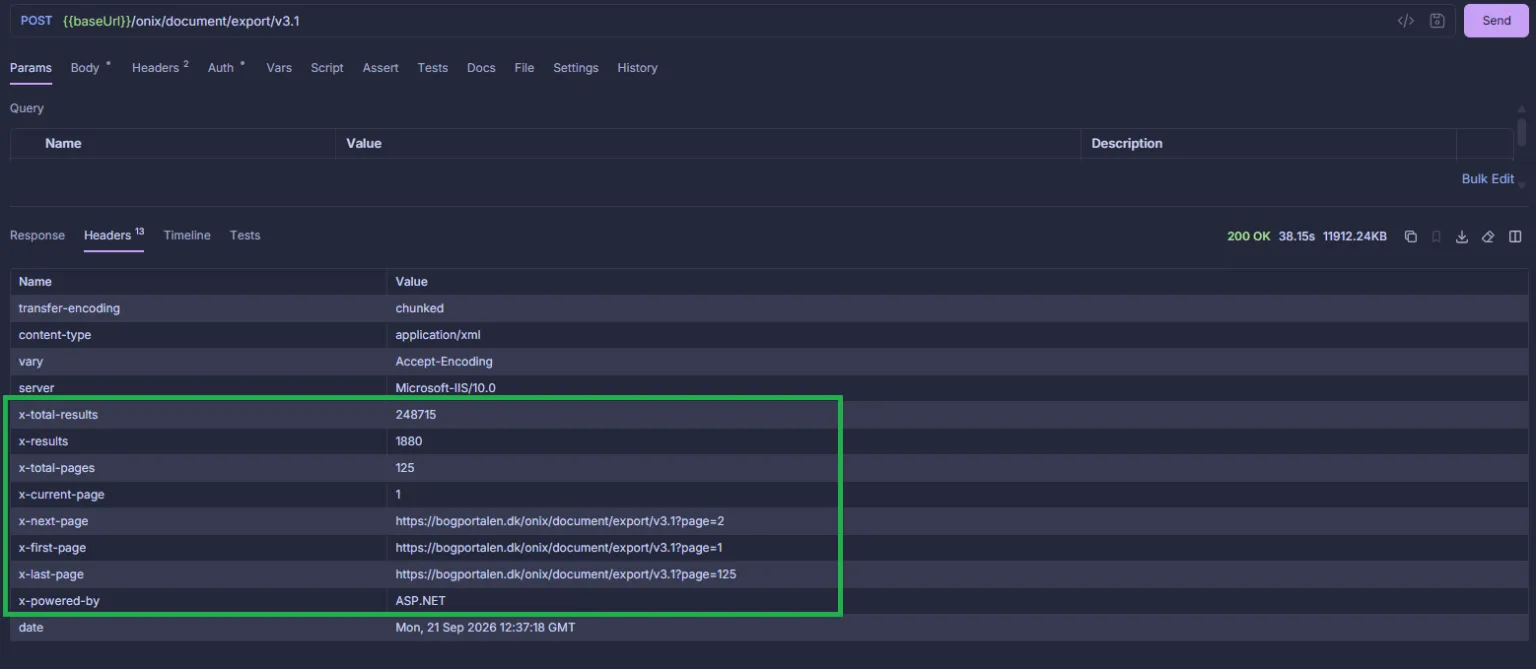
Data for pagination is returned in the response header. Use the pagination data to determine if and how many times the request needs to be repeated with a new URL, to fetch all data requested.
The following pagination data is available in the response header:
- x-total-results: Always available. Total products matching the request. E.g. “248,715”
- x-results: Always available. Products returned in the current page of the request. E.g. “2,000”
- x-total-pages: Always available. Total pages that need to be iterated through to retrieve all data in the request. E.g. “125”
- x-current-page: Always available. Current page. E.g. “1”
- x-next-page: Only available if there is more pages than the current as part of the result. URL to the next page of the result. E.g. “HTTPS://bogportalen.dk/onix/document/export/v3.1?page=2”
- x-first-page: Always available. Url to the first page of the result. E.g. “HTTPS://bogportalen.dk/onix/document/export/v3.1?page=1”
- x-last-page: Always available. Url to the last page of the result. E.g.” HTTPS://bogportalen.dk/onix/document/export/v3.1?page=125“
5) Limits & Quotas
Policy:
- Requests will return up to 2,000 products
If a request returns more than 2,000 results, information about the response and how to retrieve the next set of results is included in the response headers.
6) Status codes and errors
Status codes:
- 200: OK
- 204: Request OK. But no content. Could be due to filters that provides no results
- 401: Unauthorized. Missing or invalid authentication
- 403: Forbidden. Access denied – the user or token does not have the required permissions
- 404: Not Found. The requested resource could not be found
- 405: Method Not Allowed. The HTTP method is not allowed
- 409: Conflict. The request conflicts with the current state of the resource
- 415: Unsupported Media Type. The Content-Type is incorrect or not supported
- 422: Unprocessable Content. The request is valid, but the content cannot be processed
- 429: Too Many Requests. The rate limit has been exceeded
- 500: Internal Server Error. An internal server error occurred
- 502: Bad Gateway. An error occurred while communicating with the upstream server
- 503: Service Unavailable. The service is temporarily unavailable
- 504: Gateway Timeout. The upstream server did not respond within the allowed time
Example on an error body:
{
"type":"https://tools.ietf.org/html/rfc9110#section-15.5.2",
"title":"Publisher Id in request does not match current logged in publisher",
"status":401,
"detail":"To request an onix output please request the same Publisher ID as the currently logged in publisher",
"traceId":"00-5d607d7dc612f1adfc7cae47189f8035-b3feb12c115e9d8e-00"
}
7) Image upload endpoint
Normally, images are uploaded as a URL together with the other product updates, after which DBK retrieves the images from the specified URL.
However, it is also possible to upload images through a dedicated endpoint.
This endpoint may be relevant in the following situations:
- There are many updates related only to images and not to the other product data
- If it is not possible to provide the images through a URL that DBK can access. In such cases, the images can instead be sent directly to DBK.
URL: https://bogportalen.dk/productfileuploadapi/UploadFiles
Limits: A maximum of 50 images can be uploaded per request
Encoding: Images should be added to the request as Base64 encoded strings
Supported file formats: .jpg, .png, .gif, .bmp, .webp
Supported file types: FrontPage
{
  "files": [
    {
      "productEAN": "string", // EAN of relevant product.
      "fileName": "string", // Example: "testimage.jpeg"
      "fileType": "string", // Example: FrontPage,
      "base64EncodedFile": "string" // Example: "ZGV0IGhlciBlciBldCByaWd0aWd0IGJpbGxlZGUgb2cgaWtrZSBlbiByw6UgdGVrc3Qgc3RyZW5nLg=="
    },
    {
      "productEAN": "string",
      "fileName": "string",
      "fileType": "string",
      "base64EncodedFile": "string"
    }
  ]
}
Version history
Uptime target: 99.9% monthly.
Maintenance windows: Announced 7 days ahead (non-critical).
Status page: Public status + historical incidents. · Support: FAQ/Support page on dbk.dk. Email + ticketing portal, business hours CET/CEST.
Version history
| Date | Version | Comment |
|---|---|---|
|
13-1-2026 |
3.1 |
First version of the API in sandbox mode. Please notice that there might be minor changes to this before it goes into production |
Spørgsmål til denne side?
Indsend dit spørgsmål i nedenstående formular, så vender vi tilbage hurtigst muligt.